Instagram API post: requirements, limits and specs
To post to Instagram with the API you need an Instagram professional account, an app with the content publishing permission and two calls: one creates a media container from a public image or video URL, the other publishes it. Everything else, from the daily limit to the JPEG-only rule, decides whether those two calls work.
This guide collects the requirements, limits and media specs of the Instagram API from Meta's official documentation, shows where that documentation contradicts itself, and gives you a free preflight checker in JavaScript and Python that catches the predictable rejections before you send anything.
Technical review: 26 November 2026, against Meta's documentation for Graph API v27.0, the latest version according to the Graph API changelog (released 4 November 2026).
Key takeaways:
- Only Instagram professional accounts (Business or Creator) can publish through the Instagram publishing API.
- Every post is a container first: create it from a public URL, wait for FINISHED, then publish it.
- Meta's pages disagree on the daily limit (100 or 50 posts) and the carousel size (20 or 10 items); read the live quota instead of hard-coding a number.
- Feed images must be JPEG, up to 8 MB, between 4:5 and 1.91:1; Reels go up to 15 minutes and 300 MB.
- Most rejections are predictable and can be caught from metadata before the first API call; quota, permissions and processing errors cannot.
What you need before your first Instagram API post
Only professional accounts can publish through the API. Meta's Instagram Platform overview says the API is for professional accounts that represent a business or a creator; personal accounts are not supported. Switching a personal account to Creator is free in the Instagram app, so this is usually a setting, not a blocker.
Then you choose how users log in. Meta now documents three setups, and they differ in host, token and permissions; the overview recommends Unified Login for new integrations. Do not mix their requirements: each column below is a separate setup. The content publishing guide lists them side by side:
| Instagram Login | Facebook Login | Unified Login | |
|---|---|---|---|
| Login screen | Business Login for Instagram | Facebook Login for Business | Facebook Login for Business |
| API host | graph.instagram.com | graph.facebook.com | graph.facebook.com |
| Facebook Page | Not required | Required, linked to the account | Not required |
| Token | Instagram User token | Facebook Page token | Business Integration System User token |
| Publishing permissions | instagram_business_basic, instagram_business_content_publish | instagram_basic, instagram_content_publish, pages_read_engagement | instagram_basic, instagram_content_publish |
Two rules from Meta's App Review page shape the choice. An app uses either Facebook Login or Instagram Login, not both. And to publish for accounts you do not own or manage, you need Advanced Access, which requires App Review and Business Verification. App Review asks for a screencast of the full user experience for each permission, and Advanced Access needs at least one successful API call first. If the app only posts to your own accounts, Standard Access is enough.
Tokens expire, so plan the refresh from day one. With Instagram Login, a long-lived token lasts 60 days. According to Business Login for Instagram, you can refresh it once it is at least 24 hours old, and a token not refreshed in 60 days expires. One more trap: if the linked Page requires Page Publishing Authorization, nothing can be published until that is completed.
How to post to Instagram with the API, step by step
Publishing is always the same four steps, whatever the format. Two are required by Meta; the quota check and the status check are what make the flow safe to run without a person watching.
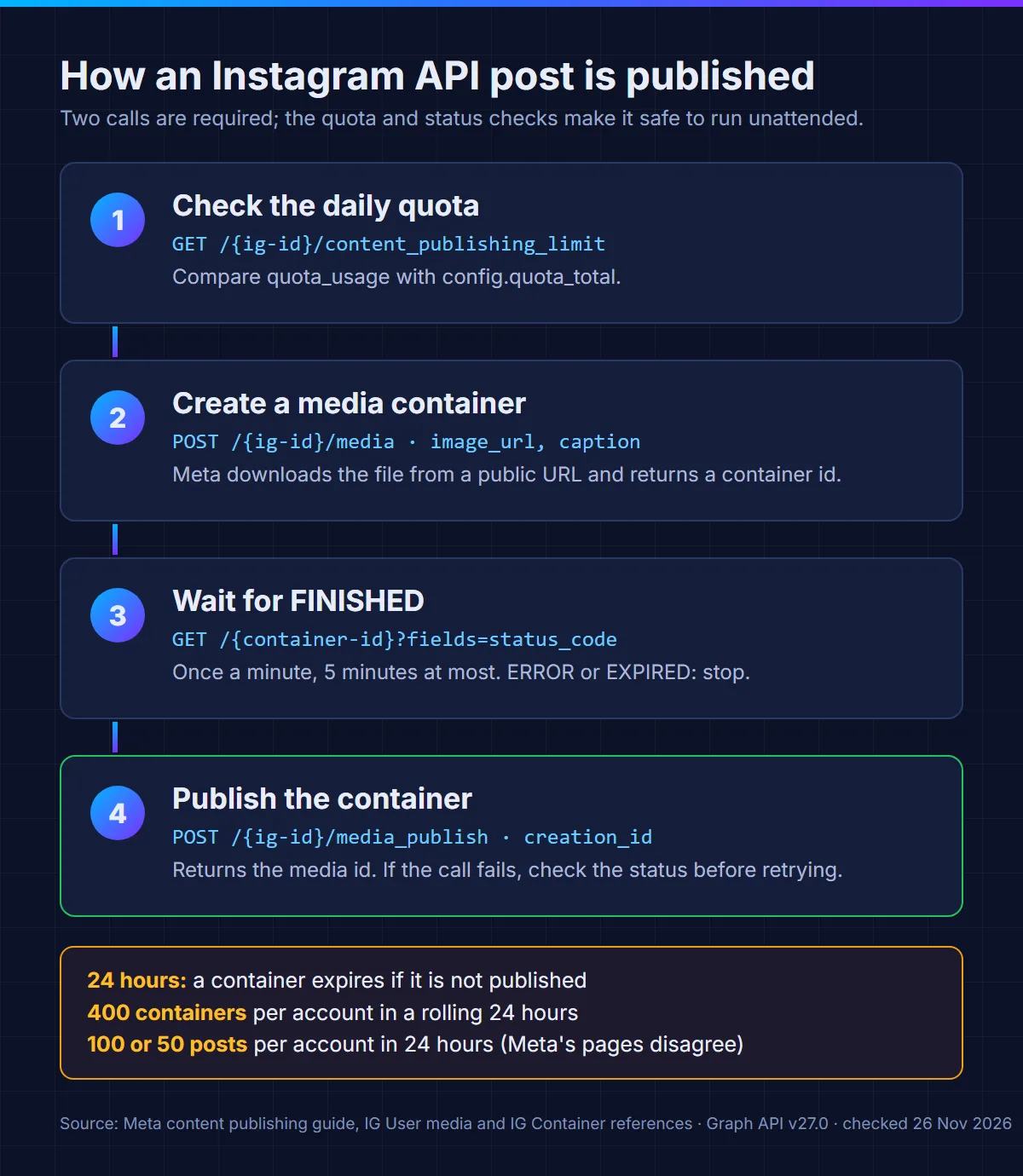
- Check the quota. GET /{ig-id}/content_publishing_limit returns quota_usage and, if you ask for it, config with quota_total and quota_duration (reference).
- Create a media container. POST /{ig-id}/media with image_url (or video_url and a media_type), plus caption and, for images, alt_text. The file must be on a publicly accessible server when you make the call, because Meta downloads it.
- Wait until the container is FINISHED. GET /{container-id}?fields=status_code returns IN_PROGRESS, FINISHED, ERROR, EXPIRED or PUBLISHED (IG Container reference). Meta asks you to check once per minute, for no more than 5 minutes.
- Publish. POST /{ig-id}/media_publish with creation_id set to the container ID. The response is the ID of the new post.
This is the flow in JavaScript with Instagram Login and Graph API v27.0. It needs Node 18 or later and no libraries. It is a teaching example: it shows each call and handles HTTP errors, but it does not retry.
const API = "https://graph.instagram.com/v27.0";
const token = process.env.IG_TOKEN; // Instagram User token, never in code or URLs
const igId = process.env.IG_ID;     // Instagram professional account ID
async function call(method, path, params = {}) {
  const url = new URL(API + path);
  const init = { method, headers: {}, signal: AbortSignal.timeout(30_000) };
  if (method === "GET") {
    for (const [k, v] of Object.entries(params)) url.searchParams.set(k, v);
    init.headers.Authorization = `Bearer ${token}`;  // token in a header, not the URL
  } else {
    init.headers["Content-Type"] = "application/json";
    init.body = JSON.stringify({ ...params, access_token: token });
  }
  const res = await fetch(url, init);
  const body = await res.json().catch(() => ({}));
  if (!res.ok || body.error) {
    const e = body.error ?? {};
    throw new Error(`HTTP ${res.status}, code ${e.code}, subcode ${e.error_subcode}: ${e.message}`);
  }
  return body;
}
// 1. Is there room in the 24-hour window?
const { data } = await call("GET", `/${igId}/content_publishing_limit`, { fields: "quota_usage,config" });
const q = data[0];
if (q.config && q.quota_usage >= q.config.quota_total) throw new Error("Daily limit reached");
// 2. Create the container (Meta downloads the image now)
const { id: containerId } = await call("POST", `/${igId}/media`, {
  image_url: "https://cdn.example.com/rye-sourdough.jpg",
  caption: "Our new rye sourdough is out today. #sourdough",
  alt_text: "Rye sourdough loaf cut in half on a linen cloth",
});
// 3. Wait for FINISHED: check now, then once a minute, five minutes at most
let s = await call("GET", `/${containerId}`, { fields: "status_code,status" });
for (let i = 0; i < 5 && s.status_code === "IN_PROGRESS"; i++) {
  await new Promise((r) => setTimeout(r, 60_000));
  s = await call("GET", `/${containerId}`, { fields: "status_code,status" });
}
if (s.status_code !== "FINISHED") throw new Error(`Container ${s.status_code} ${s.status ?? ""}`);
// 4. Publish
const { id: mediaId } = await call("POST", `/${igId}/media_publish`, { creation_id: containerId });
console.log("Published", mediaId);
Where the token goes is a security choice. Meta's examples put access_token in the query string, but URLs end up in proxy logs, monitoring tools and error trackers. This example sends it in the JSON body for POST calls, as a documented parameter, and in an Authorization: Bearer header for GET calls, the form Meta's own content publishing examples use on graph.facebook.com. If your setup rejects the header, fall back to the parameter and redact it from logs.
From example to production
The downloadable instagram-publish-example.mjs adds what a real queue needs:
- Timeouts on every call (30 seconds) and a clear error when the network fails.
- Retries with backoff only for errors Meta marks as temporary (HTTP 5xx, codes 1, 2, 4, 17, 32, 613 and 80002, subcodes 2207001 and 2207003), using X-Business-Use-Case-Usage when Meta says how long to wait.
- Every container state handled: IN_PROGRESS, FINISHED, ERROR (with its subcode), EXPIRED and PUBLISHED.
- No double posts: if media_publish fails with a temporary error, it checks whether the container is already PUBLISHED before trying again, because a timeout does not mean Meta did nothing.
We tested it against a local mock of Meta's endpoints, not a live account: test-publish-example.mjs runs 9 scenarios (ready at once, slow processing, quota full, a 500 error, an 80002 rate limit, a container ERROR, a publish that succeeded despite an error and the daily limit error 2207042) and checks that the token never appears in a URL. All 9 pass. What it still leaves to you: storing state between runs, refreshing tokens, one queue per account and alerting a person.
Containers do not wait forever. A container that is not published within 24 hours expires, and an account can create at most 400 containers in a rolling 24 hours (IG User media reference). If your queue creates containers early and publishes later, both limits matter.
Reels, stories and carousels
Reels: media_type=REELS with video_url. You can add cover_url or thumb_offset, share_to_feed, up to 3 collaborators and, for trial Reels, trial_params. A published Reel reports media_type VIDEO; check media_product_type to tell it apart.
Stories: media_type=STORIES with an image or a video. Stories expire after 24 hours, and link, poll and location stickers are not supported.
Carousels: create one container per item with is_carousel_item=true, then a parent container with media_type=CAROUSEL and children set to their IDs, and publish the parent. A Reel cannot be a carousel item, captions go on the parent only, and every image is cropped to the first image's aspect ratio (1:1 by default).
Not supported: shopping tags, filters and any image format other than JPEG, according to the content publishing guide.
Large videos have another route. Apps that use Facebook Login can upload video in chunks to rupload.facebook.com with upload_type=resumable, instead of giving Meta a public URL. Meta does not list that host for Instagram Login.
Instagram API image and video specs
Most failed Instagram API posts are media problems, not code problems. These are the specs from Meta's IG User media reference:
| Feed and carousel image | Reel | Story video | |
|---|---|---|---|
| Format | JPEG only (no PNG, WebP, HEIC or MPO) | MP4 or MOV, H.264 or HEVC, AAC audio | Same as Reels |
| Maximum size | 8 MB | 300 MB | 100 MB |
| Aspect ratio | 4:5 to 1.91:1 | 0.01:1 to 10:1, 9:16 recommended | 0.1:1 to 10:1 |
| Duration | - | 3 seconds to 15 minutes | 3 to 60 seconds |
| Other | 320 to 1440 px wide (scaled), sRGB | 23-60 fps, up to 1920 px wide, 25 Mbps, 48 kHz audio | Same encoding as Reels |
A story image only has to be JPEG and no larger than 8 MB; 9:16 is recommended. For captions, the limits are 2,200 characters, 30 hashtags and 20 @mentions, and alt_text takes up to 1,000 characters on images only: Reels and stories do not support alt text. Meta does not publish separate size or duration limits for videos inside a carousel.
Watch the most common mistake: a 9:16 photo sent to the feed. A story-sized image (1080 × 1920, ratio 0.56) is outside the 4:5 to 1.91:1 feed range, and Instagram rejects it with error 2207009. Crop it to 4:5 or publish it as a story.
Instagram API limits: what Meta's docs say, and where they disagree
The daily publishing limit is the number everyone asks about, and Meta's own pages give two answers. We read them side by side on 26 November 2026:
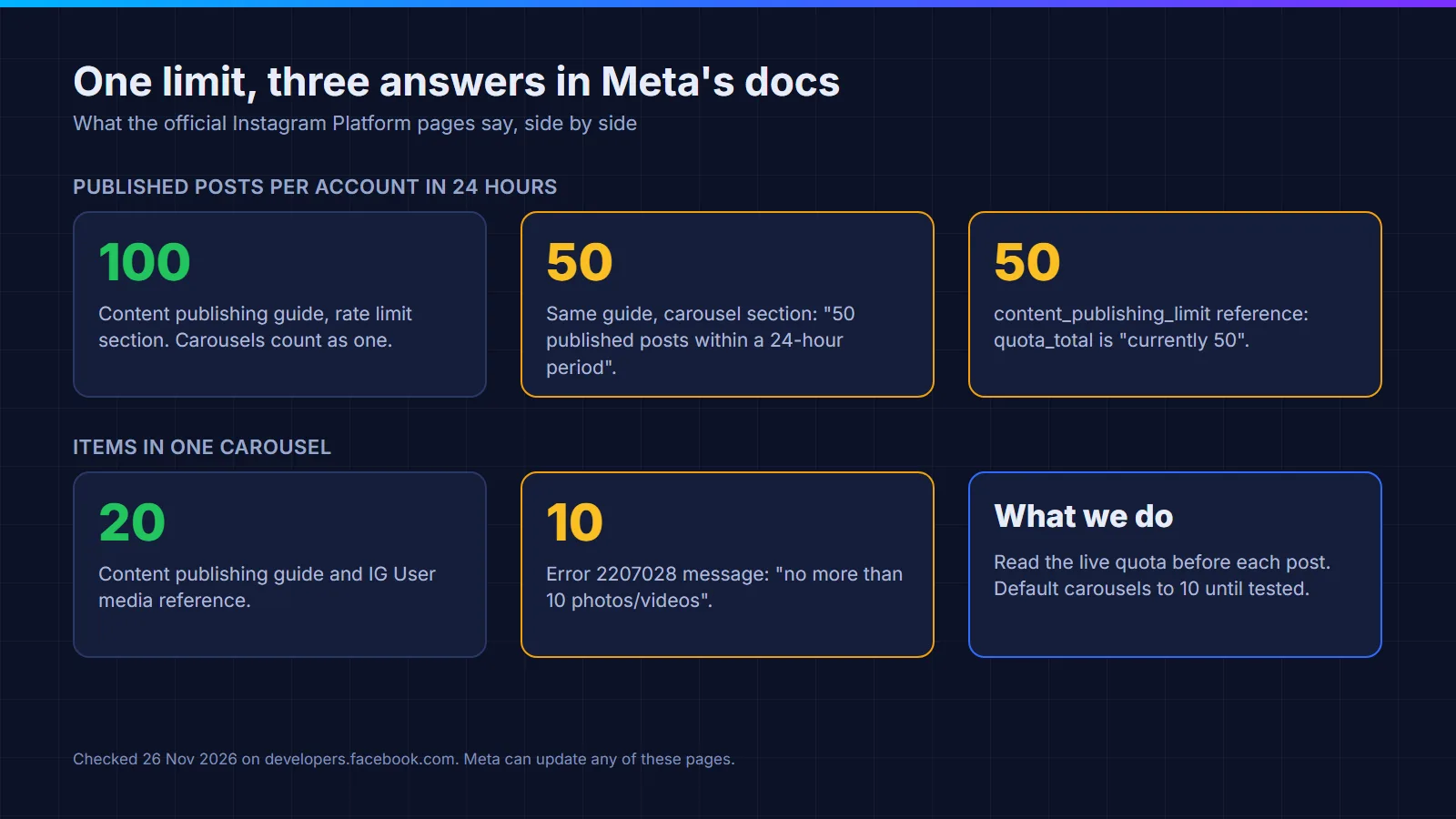
| Question | Answer 1 | Answer 2 | Where |
|---|---|---|---|
| Published posts per account in 24 hours | 100 (carousels count as one) | 50 | Rate limit section vs carousel section of the content publishing guide; the publishing limit reference says quota_total is "currently 50" |
| Items in one carousel | 20 | 10 | Guide and media reference vs the message of error 2207028 |
Our recommendation (APIWings), not Meta's: do not hard-code any of these numbers. Read content_publishing_limit before each post, because it returns the quota Meta applies to that account. Default carousels to 10 items until you have tested 20 with your own app. What you can verify yourself: call GET /{ig-id}/content_publishing_limit?fields=quota_usage,config with your token and read quota_total; publish a carousel of 11 items to a test account and see whether error 2207028 appears. We noted the 100 versus 50 gap in our comparison of social media API limits, and it is still there.
There is also a call limit. Instagram uses Business Use Case rate limits: 4,800 calls times the number of impressions in 24 hours, per app and account (rate limiting). Hitting it returns error 80002, and the X-Business-Use-Case-Usage header tells you how many minutes until you can call again.
Instagram API errors and what to do with each one
A good publisher treats each error differently: some need a new container, some need different media and some mean stop for today. These are the publishing errors from Meta's error codes table, grouped by what your code should do:
| Subcode | What happened | What to do |
|---|---|---|
| 2207027 (code 9007) | The media is not ready yet | Wait until status_code is FINISHED, then publish |
| 2207003, 2207001 | Download timeout, Instagram server error | Retry later with backoff |
| 2207020, 2207008, 2207032 | Media or container expired, creation failed | Create a new container |
| 2207004, 2207005, 2207009 | Image too large, wrong format, wrong ratio | Fix the image; do not retry as is |
| 2207026, 2207010 | Video format, caption too long | Fix the video or the caption |
| 2207052 | Meta could not fetch the URL | Use a public URL that does not need a login |
| 2207042 | Daily publishing limit reached | Try again when the 24-hour window frees a slot |
| 2207006 | Media not found: permission or token problem | Ask the user to reconnect |
| 2207051, 2207050 | Activity flagged as spam, account restricted | Stop, alert a person, do not retry in a loop |
The full map, with 20 subcodes and the rate limit codes, is in the downloads as instagram-error-codes.json, so your code can look up the action instead of parsing messages.
Check an Instagram post before you create the container
Most of the errors above can be caught before any API call. Our free preflight reads the metadata you already have (format, bytes, width, height, duration, codecs, caption) and checks it against every rule in this guide. It never opens a file, so it runs in a queue worker in milliseconds.
import { checkPost } from "./instagram-post-preflight.mjs";
const result = checkPost({
  id: "story-photo-in-feed",
  type: "IMAGE",
  caption: "Behind the counter at 6 am.",
  media: [{ kind: "image", format: "jpeg", bytes: 1800000, width: 1080, height: 1920 }],
});
console.log(result.ready, result.checks[0].code); // false image_aspect
We ran it on eight planned posts for a bakery account, the kind of week a scheduling tool sends. Two passed, one passed with warnings and five were blocked before reaching Meta:
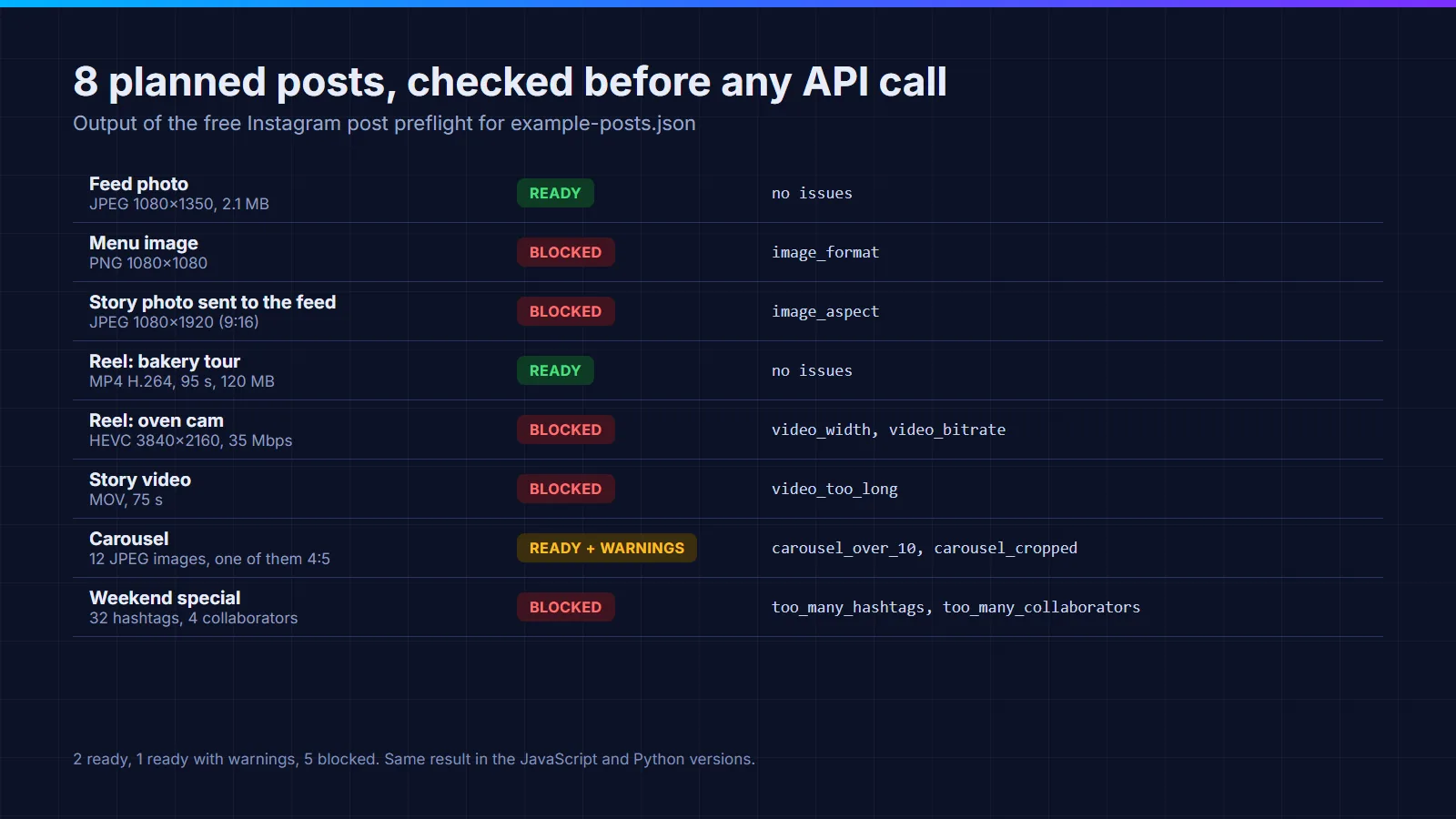
| Planned post | Result | Why |
|---|---|---|
| Feed photo, JPEG 1080 × 1350 | Ready | - |
| Menu image, PNG | Blocked | Instagram accepts JPEG only |
| Story photo sent to the feed, 1080 × 1920 | Blocked | Ratio 0.563 is outside 4:5 to 1.91:1 |
| Reel, MP4 H.264, 95 s, 120 MB | Ready | - |
| Reel, HEVC 3840 × 2160, 35 Mbps | Blocked | Wider than 1920 px and over 25 Mbps; not 9:16 (warning) |
| Story video, MOV, 75 s | Blocked | Stories allow 60 seconds |
| Carousel of 12 images | Ready, 2 warnings | Over 10 items; one image is 4:5 and will be cropped to 1:1 |
| Image with 32 hashtags and 4 collaborators | Blocked | 30 hashtags and 3 collaborators maximum |
The preflight checks the metadata you declare, not the file itself, so it cannot guarantee that Meta will accept a post. This is how the errors split:
| Caught before the request (preflight) | Only found when you call Meta |
|---|---|
| Image format, size and aspect ratio (2207004, 2207005, 2207009) | Whether Meta can reach the media URL (2207052, 2207003) |
| Video container, codec, frame rate, bitrate, duration, size (2207026 and others) | Whether the real file matches the metadata you declared |
| Caption length, hashtags and @mentions (2207010) | Whether the token is still valid and has the right permissions (2207006, code 190) |
| Carousel size and mixed aspect ratios (2207028) | Whether the account has quota left (2207042) |
| Alt text and collaborators on the wrong post type | Whether the account is restricted or flagged (2207050, 2207051) |
| Whether processing finishes: ERROR or EXPIRED containers |
Run the preflight first and keep the error handling anyway. The first column wastes containers and quota if you let Meta find it; the second column only Meta can answer.
Free resources
Everything is free to use and copy: the code under the MIT License and the data files under CC BY 4.0. The test results are reproducible: run the test files and you get the same numbers we did.
- Preflight checker: instagram-post-preflight.mjs (JavaScript) and instagram_post_preflight.py (Python, standard library only). Same rules, same results.
- Rules with sources: instagram-publishing-rules.json, every limit with the Meta page it comes from.
- Error map: instagram-error-codes.json, each subcode with the action to take.
- Worked example and tests: example-posts.json and 508 test cases. Run test-preflight.mjs or test_preflight.py: both print 508 of 508 cases pass.
- Publishing script: instagram-publish-example.mjs, the four steps with timeouts, retries and state checks, and test-publish-example.mjs, its 9 scenarios against a mock of Meta. Publishing for real needs your own token.
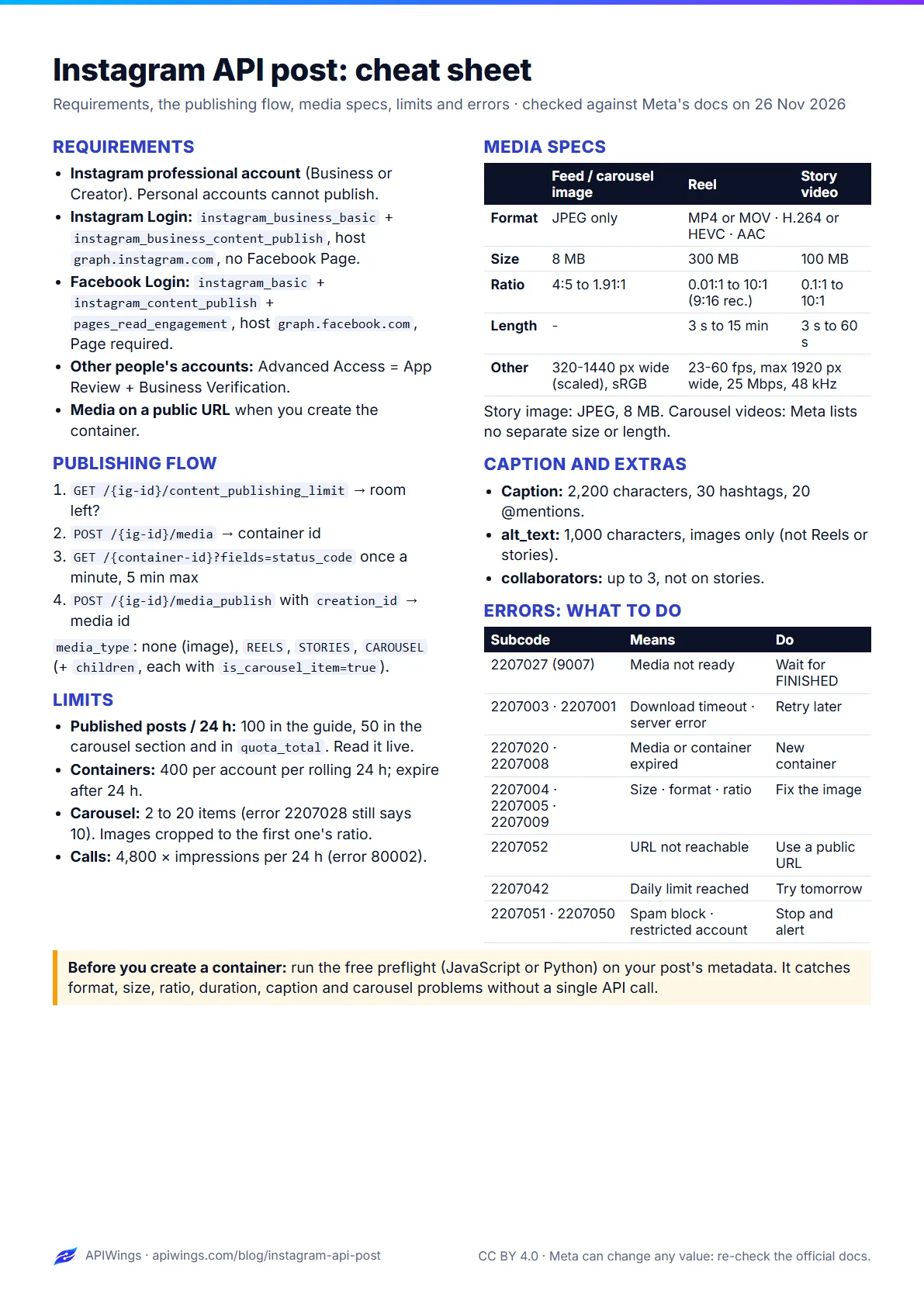
- Cheat sheet: one-page PDF with requirements, flow, specs, limits and errors. Notes in the README.
Posting to Instagram through a unified API
If Instagram is one of several networks in your product, every rule above sits next to a different set for each other network: other limits, other formats, other errors. Our guide to posting to multiple social networks with one API call shows how those rules collide in a single request, and unified social media API vs native APIs compares building each integration with buying one.
A unified social media API such as APIWings handles the Meta app, App Review, tokens and the container flow for you, and returns the real result of each post. The Instagram integration is in review with Meta and opens once Meta approves it; the APIWings Instagram docs already describe how it will work. Instagram's own limits still apply either way. If you are building a SaaS product or an AI agent that publishes for its users, you can request early access on the APIWings home page; networks open one by one as each approves the integration.
Sources and review date
Every figure in this guide comes from these Meta pages, read on 26 November 2026 (Graph API v27.0). Meta changes them without notice, so check them again before you rely on a number.
| Page | Applies to | What we took from it |
|---|---|---|
| Content publishing guide | All three login setups | Requirements table, the container flow, status polling, 100 posts in 24 hours (rate limit section), 50 (carousel section), carousels up to 20, JPEG only |
| IG User media reference | All setups; examples on graph.facebook.com | Image, Reel and story specs, caption, alt text and collaborator limits, 400 containers in 24 hours, 24-hour expiry |
| content_publishing_limit reference | All setups, permissions per setup | quota_usage, config, quota_total "currently 50", quota_duration 86400 |
| IG Container reference | All setups | status_code values and the status subcode |
| Error codes | Instagram Platform | Subcodes and messages, including 2207028 ("no more than 10") |
| Overview and App Review | All setups | Account types, Standard and Advanced Access, Business Verification, one login type per app |
| Business Login for Instagram | Instagram Login only | Token lifetimes and refresh rules |
| Rate limiting | Instagram BUC limits | 4,800 × impressions per 24 hours, error 80002, X-Business-Use-Case-Usage |
| Graph API changelog | Graph API | v27.0 is the latest version (4 November 2026) |
FAQ
Can I post to a personal Instagram account with the API?
No. The Instagram API publishes only to professional accounts, Business or Creator. A personal account can switch to Creator for free in the Instagram app and then connect to your app.
How many posts per day can the Instagram API publish?
Meta's documentation says 100 published posts per account in a moving 24-hour window in one place, and 50 in two others. Carousels count as one post. Call GET /{ig-id}/content_publishing_limit before publishing to see the quota Meta applies to that account.
Does the Instagram API support Reels, stories and carousels?
Yes. Use media_type=REELS for Reels, STORIES for stories and CAROUSEL with up to 20 child containers for carousels. Story stickers, shopping tags and filters are not supported, and a Reel cannot be part of a carousel.
Why does my Instagram API image post fail?
Usually because of the file: Instagram accepts only JPEG images up to 8 MB with an aspect ratio between 4:5 and 1.91:1, and the image must be on a public URL. Errors 2207004, 2207005, 2207009 and 2207052 cover these cases.
Do I need App Review to post to Instagram with the API?
Only to publish for accounts you do not own or manage. That needs Advanced Access, which requires App Review and Business Verification. An app that posts only to your own accounts can work with Standard Access.