Social media API limits and requirements compared
Every social network limits what its publishing API can do: who can use it, which review your app must pass, how many posts an account can publish and which formats it accepts. This guide compares those limits for Instagram, Facebook Pages, Threads, LinkedIn, TikTok, YouTube, Bluesky and X, using each network’s official documentation.
The short version: Bluesky is the most open, Instagram and Threads cap posts per account, YouTube caps uploads per app, TikTok keeps content private until your app passes an audit, and X charges for every post you create through its API.
Social media API limits at a glance
| Network | Who you can post for | Before posting for other users | Posting limit | Content rule worth knowing |
|---|---|---|---|---|
| Professional accounts (Business or Creator) | Meta App Review | 100 API-published posts per account in a 24-hour moving period; a carousel counts as one | Two steps: create a media container, then publish it | |
| Facebook Pages | Pages the user manages | App Review; Advanced access for users with no role in your app | No daily post count in the Pages docs | Publishing needs the pages_manage_posts permission |
| Threads | Threads profiles | Meta permissions threads_basic and threads_content_publish | 250 API-published posts and 1,000 replies per profile in a rolling 24 hours | Text up to 500 characters; carousels up to 20 items |
| Members, and company pages where the member is an admin, content admin or sponsored content poster | Community Management API, a vetted product, for company pages | Request limits per app depend on your access tier | Member and organization posting use different permissions | |
| TikTok | Creator accounts | An audit by TikTok to lift the private-only restriction | A daily post cap per user exists, but TikTok does not publish the number; unaudited clients can serve up to 5 users per 24 hours | privacy_level is required and must come from the creator info endpoint |
| YouTube | Channels | Google OAuth verification if your scopes are classified as sensitive or restricted | 100 videos.insert calls per day per project by default | Uploads use a separate quota from other API calls |
| Bluesky | Any account | No app review | 5,000 points per hour and 35,000 per day per account; a new post costs 3 points | 300 graphemes of text; up to 4 images of 1 MB each |
| X | Any account | Pay-per-usage API access | No fixed post cap; you pay per request | $0.015 per post, $0.20 per post with a URL (prices subject to change) |
Data checked on 14 November 2026. Each network can change its limits at any time; the sections below link to the source for every figure.
Per account or per app: the difference that matters
When you build for many end users, the most important question is not the number itself but what it is counted against. Some limits apply to each connected account, so they grow with your user base. Others apply to your whole app or project, so every user shares them.
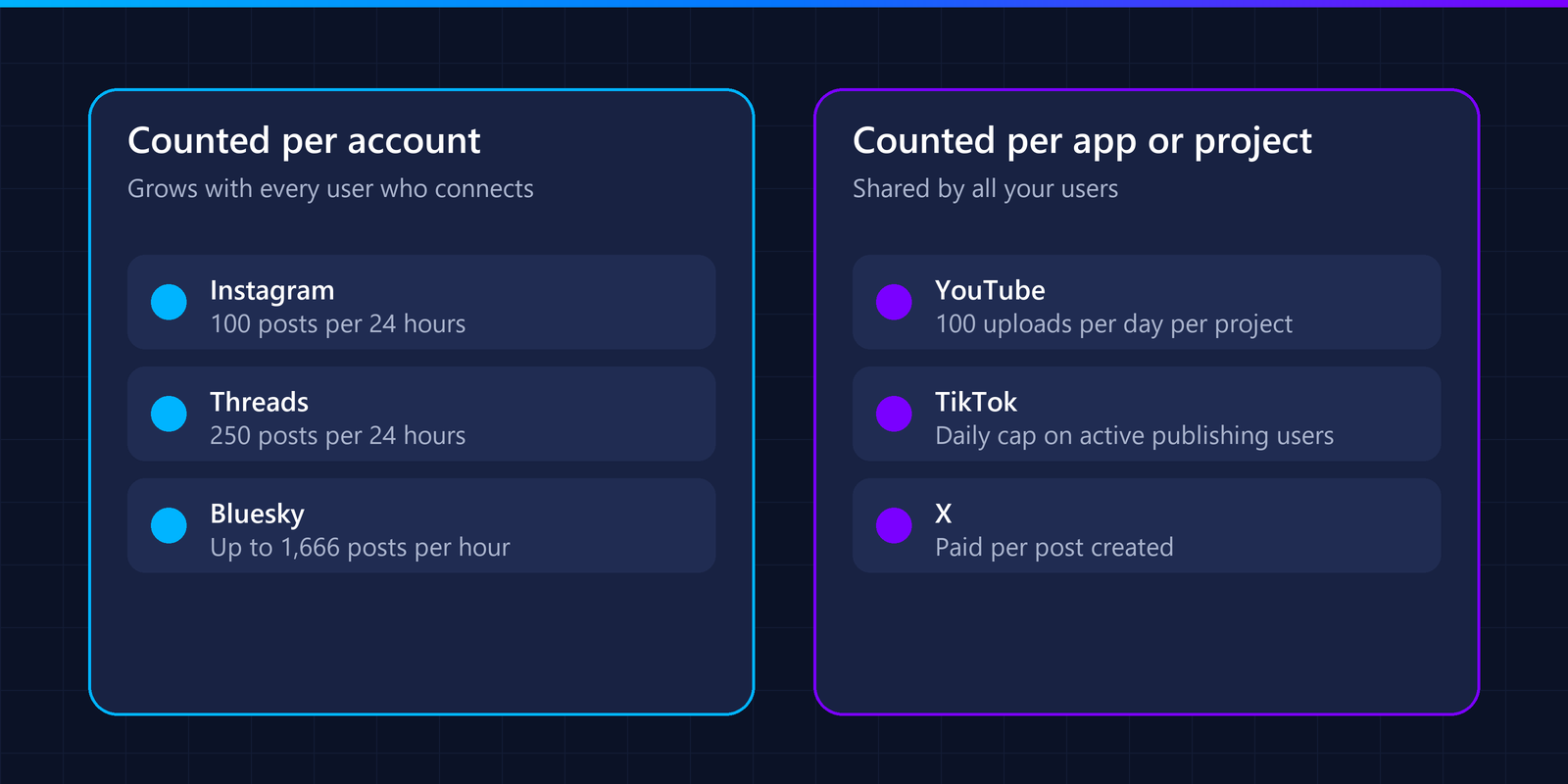
Instagram, Threads and Bluesky count posts per account; YouTube counts uploads per project.
Per account: Instagram (100 posts per 24 hours), Threads (250 posts per 24 hours) and Bluesky (points per hour and per day). Each new user brings their own allowance.
Per app or project: YouTube’s 100 video uploads per day are shared by everyone using your project. TikTok also has a daily cap on active publishing users per client.
Per request: X charges for each post you create, so cost grows with volume instead of hitting a hard cap.
If your product lets thousands of users publish video to YouTube, the default project quota will run out long before any single user notices a limit. Plan a quota increase request early.
Instagram API limits
The Instagram API works only with professional accounts: the Instagram API with Instagram Login is for “businesses and creators”, and personal accounts are not supported.
Publishing is a two-step flow: you create a media container and then publish it. According to Meta’s content publishing guide, “Instagram accounts are limited to 100 API-published posts within a 24-hour moving period. Carousels count as a single post.” The same page explains how to check current usage through the content_publishing_limit endpoint, which is worth calling before you queue posts. This is the Instagram API rate limit that matters most when you schedule content: 100 posts per account every 24 hours.
One detail worth knowing: Meta’s own page gives two numbers. The Requirements section says 100 API-published posts per 24 hours, while the carousel section says “Accounts are limited to 50 published posts within a 24-hour period.” (see the Instagram API content publishing guide). Meta does not reconcile the two, so if your product publishes carousels, treat 50 as the safe ceiling until Meta clarifies. Instagram Platform calls are also subject to Meta’s Business Use Case rate limits, which return error code 80002.
Facebook Pages API limits
To publish to a Page, your app needs the pages_manage_posts permission, listed in the Pages API documentation as “Publish and schedule content”. The Pages API overview states that all permissions require App Review once your app is live, and that for Business apps they must be approved for Advanced access before users with no role in your app can grant them.
Pages have no daily post count, but Graph API calls are still rate limited at the app level. According to Meta’s Graph API rate limiting documentation, calls made with a user token are limited to “200 * Number of Users” per hour for the app, and calls made with a Page token count towards a 24-hour limit of “4800 * Number of Engaged Users”. Meta does not publish the user counts it uses. When you hit a limit, the API returns error code 4 (app), 17 (user), 32 (Pages) or 613 (custom limit).
Threads API limits
Threads follows the same container model as Instagram: create a media container, then publish it (Threads posts guide). Publishing requires the threads_basic and threads_content_publish permissions.
The Threads API overview sets the limits: “Threads profiles are limited to 250 API-published posts within a rolling 24-hour period”, plus 1,000 replies in the same window, and “Text posts are limited to 500 characters.” Carousels can hold up to 20 items and count as a single post.
LinkedIn API limits
LinkedIn separates posting as a person from posting as a company. The w_member_social permission lets you “post, comment, and like posts on behalf of an authenticated member”. The w_organization_social permission does the same for an organization, restricted to members who are an administrator, content admin or direct sponsored content poster of that page (Posts API).
Company page posting belongs to the Community Management API, which LinkedIn describes as a “Vetted Product with development and standard tiers”. You start in the development tier with lower request limits and apply for the standard tier for full access. In short, the LinkedIn API access requirements for company pages are a vetted product, a development tier first and an admin role on the page.
LinkedIn also versions its Marketing APIs and retires old versions. For example, version 202511 reached its scheduled sunset on 16 November 2026, so an integration needs regular maintenance to keep working.
TikTok API limits
TikTok’s Content Posting API has the strictest rule for new apps: “All content posted by unaudited clients will be restricted to private viewing mode” (getting started). To publish public videos for your users, your app must pass TikTok’s audit. Passing the TikTok API audit is what moves an integration from private-only posts to public ones.
Every direct post must include a privacy_level, and the value has to match one of the options returned by the creator info endpoint for that user (Direct Post reference). The same reference lists error codes for a daily post cap per user and a daily cap on active publishing users per client, without publishing the exact numbers, and limits each user token to 6 post initialisation requests per minute.
The audit also caps how many people you can serve. According to TikTok’s Content Sharing Guidelines, “Unaudited API Clients can allow up to 5 users to post in a 24 hour window”, and every account posting through the client must be set to private at the time of posting. That makes the audit the first real gate for any product with more than a handful of TikTok users. TikTok signals each case with a specific error code: reached_active_user_cap when your client’s daily quota of active publishing users is reached, spam_risk_too_many_posts when the user’s own daily cap is reached, and unaudited_client_can_only_post_to_private_accounts when an unaudited client tries to post to a public account (see the Direct Post reference). Uploads accept MP4, QuickTime and WebM files.
YouTube API limits
By default, a project that enables the YouTube Data API gets “100 videos.insert calls” per day, separate from the 10,000 units per day shared by most other endpoints (quota costs). Because that quota belongs to your Google Cloud project, all your users share it. That 100-upload default is the YouTube API upload limit to plan around.
Uploading on behalf of users uses the youtube.upload OAuth scope. Google requires apps that request scopes classified as sensitive or restricted to complete its OAuth app verification before they get access, so check the classification of your scopes in the Google Cloud console early.
The default quota is not a hard wall, but raising it takes a review. Google’s quota and compliance audits page says you must first complete a compliance audit, which starts with the “YouTube API Services - Audit and Quota Extension Form”. The page promises that a team member will contact you as soon as possible and gives no other timeframe, so budget time for it and do not assume it will be quick.
Bluesky API limits
Bluesky is the most open of the networks here: it is built on the AT Protocol and does not require an app review. Limits apply per account, so the Bluesky API rate limit grows with your user base. The default hosting service allows 5,000 points per hour and 35,000 points per day, where creating a record costs 3 points, which means “an account may create at most 1,666 records per hour and 11,666 records per day” (rate limits).
A post’s text is limited to 300 graphemes, and a post can carry up to four images (posts guide), each up to 1 MB.
X API limits
X uses pay-per-usage pricing: “No subscriptions—pay only for what you use.” Creating a post costs $0.015 per request, or $0.20 if the post contains a URL (X API pricing). X notes that prices are subject to change, so check the page before you estimate costs.
What these limits mean for a SaaS product
The number in the table matters less than what it is counted against. These examples use only the figures above; the arithmetic is ours, so adapt it to your own volumes.
YouTube: with the default 100 uploads per day shared by the whole project, you reach the limit when 100 users each upload one video in the same day. At 1,000 daily uploaders you would need ten times the default quota, which means passing the audit first.
TikTok before the audit: up to 5 users can post per 24 hours, all on private accounts. A closed beta with 20 active TikTok users cannot be served until the audit is done.
Instagram: 100 posts per account per 24 hours (or 50 if you count the carousel figure). A scheduling tool that publishes five posts a day per account uses about 5% of the allowance, and because it is per account it does not grow when you add users.
Bluesky: at 3 points per post and 5,000 points per hour, one account can create at most 1,666 posts an hour, roughly one every two seconds. No normal user or scheduler gets near it.
X: cost is linear. At the published prices, 1,000 posts without a link cost $15 and 1,000 posts with a link cost $200, so a link in every post multiplies the bill by about 13.
The pattern: the limits that hurt first are not the ones with the smallest number but the ones counted per app or per client, such as the YouTube project quota and TikTok’s unaudited user cap. Those are the ones to plan around before you have users.
What the TikTok review actually checks
TikTok’s audit is the review with the most detailed product requirements. The Content Sharing Guidelines require your upload screen to do the following before a user can publish:
- Show the creator’s nickname, so users know which account receives the post.
- Offer a privacy dropdown with no default value, using only the options returned by the creator info endpoint.
- Leave comment, Duet and Stitch off by default, and grey out any interaction that creator info reports as disabled.
- Keep the commercial content toggle off by default. When it is on, the user must pick “Your brand” or “Branded content”, labelled “Promotional content” or “Paid partnership”.
- Show the Music Usage Confirmation declaration before the publish button, with the Branded Content Policy added for branded content.
- Let users edit the title, preview the post and consent explicitly, and warn that processing can take a few minutes.
In other words, the audit reviews your product’s interface, not just your API calls. If you build directly on TikTok’s API, plan design time for this screen, not just engineering time.
How to stay within the limits
- Check usage before you publish. Instagram exposes a publishing limit endpoint; use it instead of waiting for an error.
- Handle the documented error codes. Meta uses 4, 17, 32 and 613 for rate limits and 80002 for Instagram; TikTok uses spam_risk_too_many_posts and reached_active_user_cap. Map each one to “retry later”, “ask the user to reconnect” or “stop and alert”, instead of treating all failures the same.
- Queue and retry. When a network returns a rate limit error (for example, HTTP 429), retry later with backoff instead of failing the post.
- Validate content first. Character limits, image counts and privacy options differ on every network; check them before sending.
- Start reviews early. Meta App Review, TikTok’s audit and Google’s verification can take weeks.
- Request more quota before you need it. Especially for YouTube, where the limit is shared by your whole project.
- Watch API versions. Networks such as LinkedIn retire old versions on a schedule.
One integration instead of eight
Each network in this table has its own review, limits and content rules, and each one changes over time. A unified social media API handles those differences behind one request format. APIWings is building one: Bluesky is live today, and Instagram, Facebook, LinkedIn, TikTok, YouTube and Threads open as each network approves our integration.
FAQ
Which social media API has the strictest limits?
For new apps, TikTok: content from unaudited apps can only be viewed privately. For volume, YouTube is the tightest by default, with 100 uploads per day shared by your whole project.
Are social media API limits per user or per app?
It depends on the network. Instagram, Threads and Bluesky count posts per account. YouTube counts uploads per project, and TikTok also caps active publishing users per app.
Do I need an app review to post through a social media API?
To post on behalf of other users, yes on Meta (Instagram, Facebook, Threads), LinkedIn company pages and TikTok, and Google may require OAuth verification for YouTube. Bluesky does not require an app review.
What is the Instagram API rate limit?
Instagram accounts are limited to 100 API-published posts within a 24-hour moving period, and a carousel counts as one post. Check the content_publishing_limit endpoint before you queue posts.
What is the YouTube API upload limit?
By default a project gets 100 videos.insert calls per day, shared by all the users of that project. Request a quota increase before your user base grows.
What is the TikTok API audit?
It is a review by TikTok that an API client must pass to lift the private-only restriction. Until then, all content posted by the client is restricted to private viewing, only up to 5 users can post in a 24-hour window, and those accounts must be private. The audit checks your product against TikTok’s terms and its Content Sharing Guidelines.
How often do these limits change?
Without a fixed schedule. Networks update limits, permissions and API versions several times a year, so check the official documentation linked in each section before you build.