Social media scheduling API: how to schedule posts
To schedule social media posts with an API, you either send a future publish time to a network that schedules natively, or you keep the post in your own queue and publish it at the right moment. Of the eight networks most products publish to, only Facebook Pages and YouTube accept a publish time in their official publishing APIs. For Instagram, Threads, LinkedIn, TikTok, X and Bluesky, the scheduler is your code.
This guide shows what each network supports, according to its official documentation, and the problems that only appear weeks after a post is scheduled: time zones, expired tokens and expired containers. It ends with a free schedule planner for JavaScript and Python that finds those problems on the day the post is scheduled.
Which social media APIs support scheduled posts
This is what each network's official publishing API offers for scheduling, checked in its documentation in November 2026:
| Network | Native scheduling | How it works | What matters for scheduling |
|---|---|---|---|
| Facebook Page | Yes | published=false and scheduled_publish_time. The Pages API guide allows 10 minutes to 30 days ahead (docs); the Page feed reference says 75 days (reference) | Plan for the stricter 30 days; posts further ahead wait in your own queue |
| YouTube | Yes | Upload with privacyStatus set to private and publishAt in ISO 8601, only on a video that has never been published (docs) | Default quota of 100 uploads a day per project (docs) |
| No | Create a media container, then call media_publish at publish time (docs) | Containers not published within 24 hours expire | |
| Threads | No | Create a container, wait about 30 seconds, then call threads_publish (docs) | Containers expire after 24 hours; 250 posts per profile in 24 hours (docs) |
| No | POST /rest/posts. PUBLISHED is the only lifecycleState accepted on creation (docs) | No draft or scheduled state can be created | |
| TikTok | No | Query creator_info, then call the Direct Post init endpoint (docs) | The user chooses the privacy level, with no default; a daily cap per creator that varies, typically around 15 posts (guidelines) |
| X | No | POST /2/tweets has no scheduling field (docs) | — |
| Bluesky | No | createRecord. createdAt is set by the client, and the official examples set it to the current time (docs) | 5,000 points per hour per account; creating a post costs 3 (docs) |
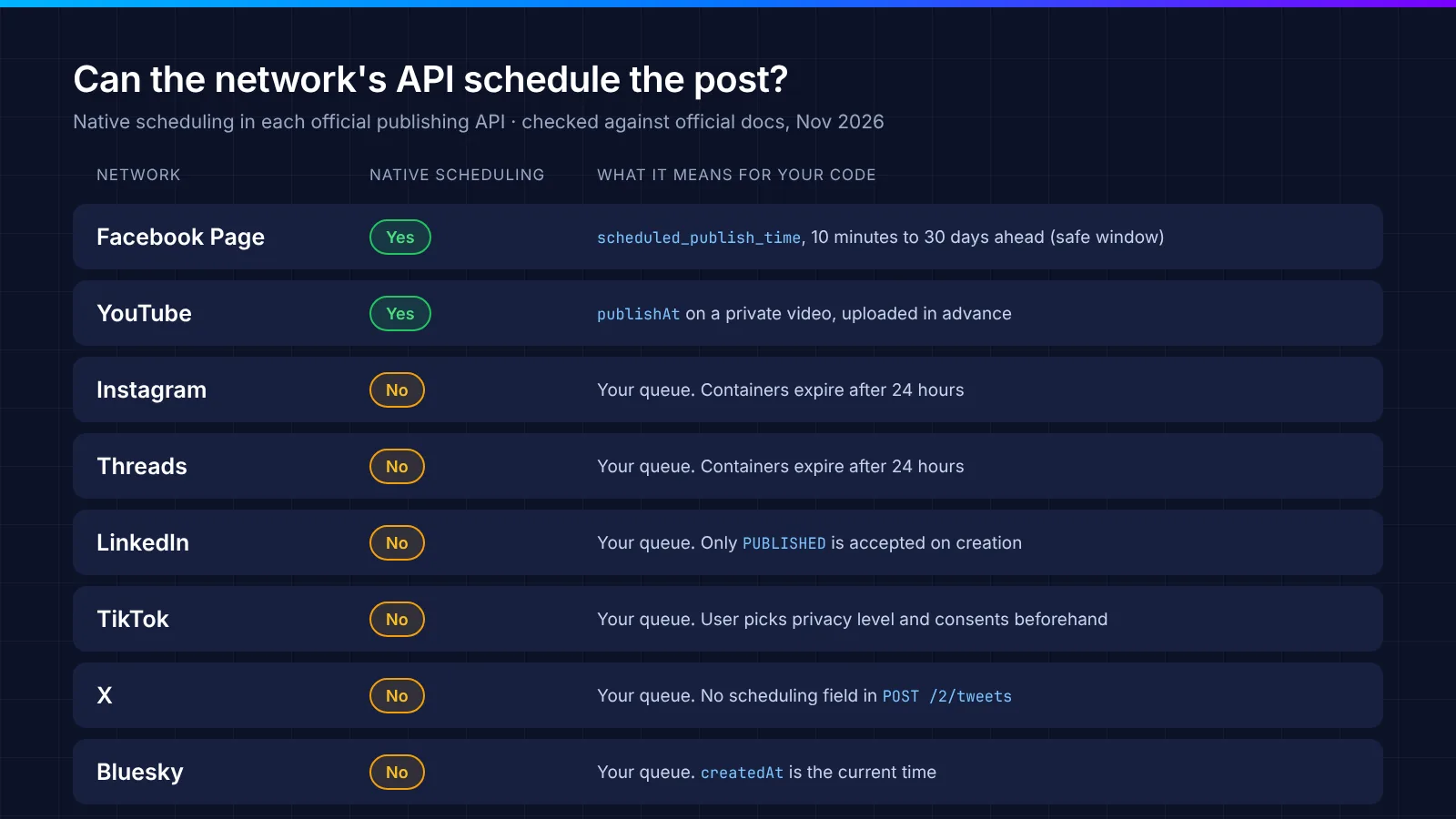
Native scheduling has an advantage that is easy to miss: once the network has the post, it no longer needs your server or the user's token at publish time. For the other six networks, two things must be true at the minute the post is due: your scheduler is running, and the user's connection still works.
Meta's documentation is not consistent on two points. For Facebook, the Pages API guide gives a scheduling window of 10 minutes to 30 days, the Page feed reference says 75 days, and the Page videos reference allows up to 6 months for videos (reference). Until Meta aligns them, hand posts to Facebook no more than 30 days ahead: that works under every version.
The Instagram guide gives a limit of 100 API-published posts per 24 hours, but its carousel section says 50. Rather than trusting either number, check GET /{ig-user-id}/content_publishing_limit before publishing. We collected the other posting limits in our comparison of social media API limits.
What your own scheduler has to do
For the networks without native scheduling, a scheduler is a queue plus a worker. Each scheduled post goes through the same steps:
- Save the post with the local time and the time zone the user chose.
- Validate the content and the connection when the post is scheduled, then check both again shortly before publishing. Our guide to posting to multiple social networks with one API call covers the content checks.
- Claim each due post once, so two workers never publish it twice.
- Prepare a few minutes before: refresh tokens, upload media, create containers.
- Publish and store one result per network, keyed by an idempotency key of your own.
- Reconcile and retry: if a result is uncertain, check the network before retrying; retry only what failed, with backoff, and tell the user which network failed and why.
Containers and uploads: not too early, not too late
Preparing a post the day you schedule it sounds safe, but on Instagram and Threads it fails: a media container that is not published within 24 hours expires. Create it a few minutes before publish time, then check its status. Meta recommends checking once a minute for no more than 5 minutes (Instagram docs), and waiting about 30 seconds before publishing a Threads container (Threads docs).
TikTok needs a different kind of preparation. Its guidelines require the user to pick the privacy level themselves, with no default, and to consent before content is sent (guidelines). Collect both when the user schedules the post. Then query creator_info again just before publishing, because the privacy level you send must be one of the options it returns at that moment.
YouTube works the other way round: upload the video when the user schedules it, so processing has finished long before publishAt.
Prevent duplicate posts: claim jobs and reconcile results
If you run more than one worker, or a worker restarts mid-run, the same post can be picked up twice. Claim it with a single atomic update and a lease, so a crashed worker's post becomes available again when the lease ends:
UPDATE scheduled_posts
SET status = 'publishing', locked_until = :lease_end, attempts = attempts + 1
WHERE id = (
  SELECT id FROM scheduled_posts
  WHERE publish_at_utc <= :now
    AND (status = 'pending' OR (status = 'publishing' AND locked_until < :now))
  ORDER BY publish_at_utc LIMIT 1
)
RETURNING id, network, idempotency_key;
We tested this query on SQLite 3.35 or later (it needs RETURNING) with 8 workers claiming 200 due posts at the same time: every post was claimed exactly once. On PostgreSQL, add FOR UPDATE SKIP LOCKED to the inner SELECT; other databases need their own locking syntax.
The claim only stops two of your workers from taking the same job. It does not guarantee that the post reaches the network exactly once. If the network publishes the post but the response is lost, for example in a timeout, your worker cannot tell whether it worked. Most native publishing APIs do not accept an idempotency key, so the key lives in your own database, and an uncertain result needs reconciling: mark the job as uncertain, look for the post on the network (for example, in the account's latest posts) and retry only if it is not there.
Time zones: the bug that shows up months later
Store the local time and the time zone name, such as 2027-03-15T09:00 and America/New_York. Do not store the local time with today's UTC offset.
Here is why. On 24 November 2026 a user in New York schedules a post for 9:00 on 15 March 2027. New York is at UTC−05:00 today, so storing 09:00-05:00 looks right. But New York moves to daylight saving time on 14 March 2027, and on publish day it is at UTC−04:00. The stored offset sends the post at 14:00 UTC, which is 10:00 in New York: one hour late, on every post scheduled across the change.
Two more cases need a rule of their own:
- Local times that do not exist. At 2:00 on 14 March 2027, New York clocks jump to 3:00, so 2:30 that day never happens. Reject it and ask for another time.
- Local times that happen twice. At 2:00 on 7 November 2027, the clocks go back to 1:00, so 1:30 happens twice. Pick one rule, for example the first occurrence, and apply it everywhere.
Convert to UTC with a time zone database (IANA names), and keep the local time and zone so you can recompute the UTC time if the user edits the post or time zone rules change.
Tokens that expire before the post goes out
A post scheduled for next month needs a connection that still works next month. These are the documented lifetimes:
| Network | Access token | Renewal |
|---|---|---|
| Facebook Page | A Page token obtained from a long-lived user token has no expiration date (docs) | It can still be invalidated, so check it before publishing |
| Long-lived user token: about 60 days (docs) | Reconnect or refresh before it ends | |
| Threads | Long-lived token: 60 days (docs) | Refresh once it is at least 24 hours old; a token not refreshed within 60 days expires for good |
| 60 days (docs) | Programmatic refresh tokens, for approved partners, last 365 days and are not extended by refreshing | |
| TikTok | 2 hours (docs) | Refresh tokens last 180 days, and each refresh returns a new one that you must store |
| X | 2 hours (docs) | A refresh token is issued only with the offline.access scope |
| YouTube | Short-lived (docs) | Google refresh tokens expire after 7 days if your OAuth app is external and in Testing status, and stop working after six months without use |
Any of these tokens can also end early: the user can revoke your app's access, and networks can invalidate them (LinkedIn, for example, reserves the right to revoke tokens at any time). Two rules follow. First, check the connection when the post is scheduled: if it will expire before publish time, tell the user now, not after the post fails. Second, store the new refresh token every time you refresh on TikTok, or the next refresh fails.
A worked example: one post, eight networks, four months ahead
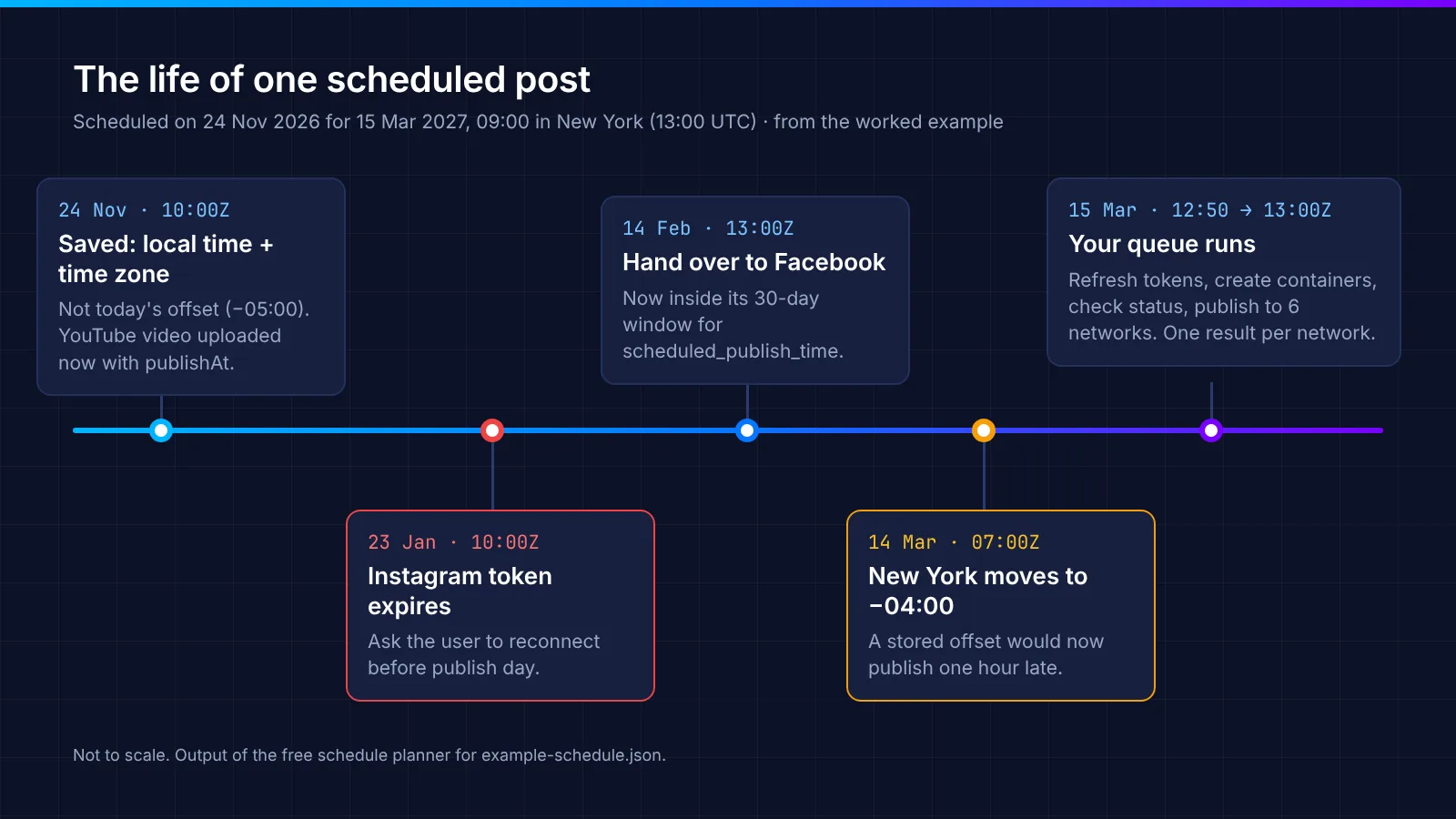
Take the New York post from above: scheduled on 24 November 2026 at 10:00 UTC, for 9:00 on 15 March 2027, to all eight networks. The user connected Instagram recently, with a 60-day token. The YouTube app is still in Google's Testing status, so its refresh token expires in 7 days. We ran this case through the free schedule planner from the resources below (the input is example-schedule.json):
| Network | Mode | What happens and when (UTC) | Problem found |
|---|---|---|---|
| Facebook Page | Native, later | Kept in your queue, handed to Facebook on 14 February at 13:00 | More than 30 days ahead, the safe window |
| YouTube | Native | Uploaded today as private with publishAt 2027-03-15T13:00:00Z | None: YouTube publishes it, so the 7-day token does not matter |
| Your queue | Container at 12:50, status checks, publish at 13:00 | The connection expires on 23 January, before publish day | |
| Threads | Your queue | Container at 12:50, publish at 13:00 | — |
| Your queue | Media upload at 12:50, publish at 13:00 | The connection expires 4 days after publish day | |
| TikTok | Your queue | Token refresh and creator_info at 12:50, publish at 13:00 | — |
| X | Your queue | Token refresh at 12:55, publish at 13:00 | — |
| Bluesky | Your queue | Session refresh and image upload at 12:55, publish at 13:00 | — |
On top of that, the planner warns that New York is at UTC−05:00 today but UTC−04:00 on publish day. Three problems found on the day of scheduling that would otherwise appear months later: a missed Instagram post, a post one hour late, and a Facebook request outside the 30-day window in Meta's guide.
Build a scheduler or use a unified API
Everything above is code you write and run once per network: a queue, workers, token renewal, containers and time zones. A unified social media API does it for you behind one request. We compare both options, with costs and lock-in, in unified social media API vs native APIs.
With APIWings, for example, scheduling is one optional field: POST /v1/posts takes scheduled_at in ISO 8601, with the same required idempotency_key as any post (API docs). The result of each network arrives by signed webhook (post.published or post.failed), and an account.expiring webhook warns up to 7 days before a connection that cannot be renewed automatically. Bluesky, LinkedIn and X are live; Instagram, Facebook, Threads, TikTok and YouTube open as each network approves the integration.
{
  "profile_id": "...",
  "content": "Our spring launch is live",
  "platforms": [
    { "platform": "bluesky" }
  ],
  "scheduled_at": "2027-03-15T13:00:00Z",
  "idempotency_key": "spring-launch-001"
}
Send scheduled_at in UTC, converted from the user's local time and time zone as described above.
Free resources: schedule planner, rules as JSON and a cheat sheet
Everything in this guide is available in reusable formats. They are free to use; the data is CC BY 4.0 and the code is MIT.
- Schedule planner for JavaScript and for Python: give it a local time, a time zone, the networks and when each connection ends. It returns the UTC time, whether each network schedules natively, what to prepare and when, and every problem it finds. It plans; it does not publish.
- Scheduling rules (JSON): native scheduling, preparation and token lifetimes for eight networks, with a source link for every value.
- Example schedule (JSON): the input of the worked example, to reproduce it.
- Test cases (JSON) and test scripts (Python, JavaScript): the 406 cases with their expected plans, so you can check both versions yourself with python test_planner.py and node test-planner.mjs.
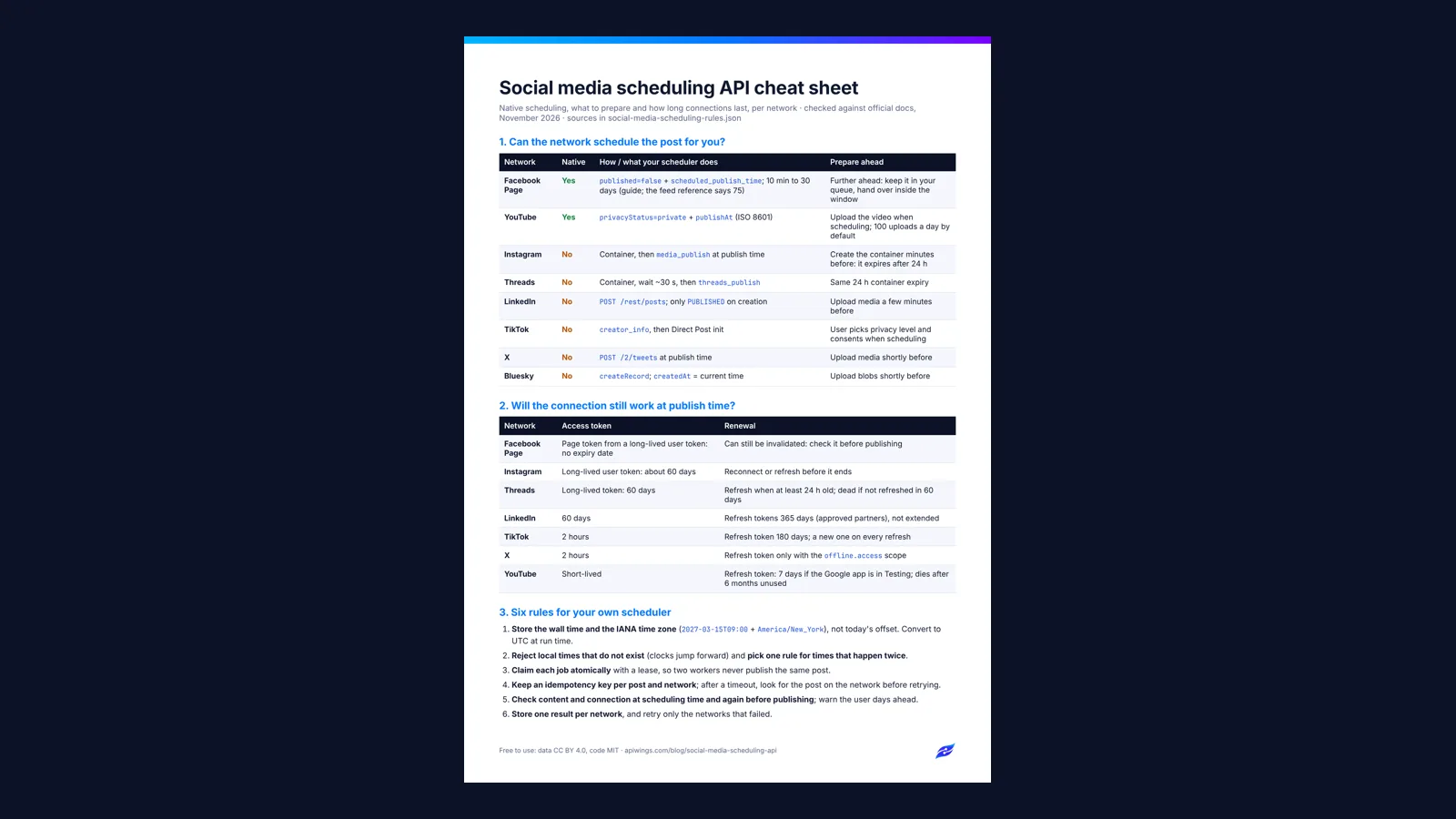
- Cheat sheet (PDF): one printable page with both tables and six rules for your own scheduler.
Using the planner takes one call. In JavaScript (Node 18 or later, no dependencies):
import { readFileSync } from "node:fs";
import { plan } from "./schedule-planner.mjs";

const { request, now } = JSON.parse(readFileSync("./example-schedule.json", "utf8"));
const result = plan(request, now);
console.log(result.publish_at_utc);              // 2027-03-15T13:00:00Z
console.log(result.networks.instagram.problems);
// [ 'connection expires 2027-01-23T10:00:00Z, before 2027-03-15T13:00:00Z: ask the user to reconnect first' ]
And in Python (3.9 or later, no dependencies):
import json
from schedule_planner import plan

data = json.load(open("example-schedule.json", encoding="utf-8"))
result = plan(data["request"], data["now"])
for network, entry in result["networks"].items():
    print(network, entry["mode"], entry["problems"] or "ok")
Both versions return identical plans: we ran them on 406 cases across ten time zones, including New York, Madrid, Kolkata (UTC+05:30) and Lord Howe Island, where clocks change by 30 minutes. A local time that does not exist raises an error in both. The cases and the expected results are in the downloads. The preparation times, such as creating containers 10 minutes before, are our defaults, not network rules: change them in the code if you need to.
Checklist for scheduling posts through an API
- Store the local time and the IANA time zone, not today's offset.
- Reject local times that do not exist and choose a rule for times that happen twice.
- Use native scheduling where it exists: Facebook Pages up to 30 days ahead, YouTube with publishAt.
- Create Instagram and Threads containers minutes before publishing, never a day before.
- Collect TikTok's privacy level and consent when the user schedules the post.
- Check every connection at scheduling time and again before publishing.
- Claim each due job once, keep an idempotency key per post and network, and reconcile uncertain results before retrying.
FAQ
Which social media APIs support scheduled posts natively?
Among the main networks, Facebook Pages and YouTube. Facebook accepts a publish time from 10 minutes ahead (30 days at most according to its Pages API guide), and YouTube publishes a private video at the time set in publishAt. Instagram, Threads, LinkedIn, TikTok, X and Bluesky need your own scheduler.
Can I schedule Instagram posts with the API?
Not natively. The Instagram API has no publish time field, so your scheduler calls media_publish at the right moment. Create the media container a few minutes before, because containers not published within 24 hours expire.
How far in advance can I schedule a Facebook post with the API?
Meta's Pages API guide says between 10 minutes and 30 days from the time of the request, using published=false and scheduled_publish_time, although the Page feed reference says 75 days and videos allow up to 6 months. To be safe, keep posts further ahead than 30 days in your own queue and send them to Facebook once they are within 30 days.
Can I schedule LinkedIn posts with the API?
Not natively. LinkedIn's Posts API accepts only PUBLISHED as the state of a new post, so there is no draft or scheduled state. Your scheduler creates the post at publish time, with a token that lasts 60 days.
How should I store the time of a scheduled post?
As the local time plus an IANA time zone name, such as America/New_York, and convert it to UTC with a time zone database. Storing today's UTC offset makes posts scheduled across a daylight saving change go out one hour early or late.
Related articles
- How to post to multiple social networks with one API call
One request, many networks: per-network limits, a reproducible example, partial failures and a free cross-post validator for JavaScript and Python.
- Unified social media API vs native APIs: build or buy?
Build each social network integration yourself or use a unified social media API? Calls per post, token expiry, API versions, real costs and lock-in.
- Social media API limits and requirements compared
Posting limits, app reviews and content rules for the Instagram, Threads, LinkedIn, TikTok, YouTube, Bluesky and X APIs, checked against official docs.