Unified social media API vs native APIs: build or buy?
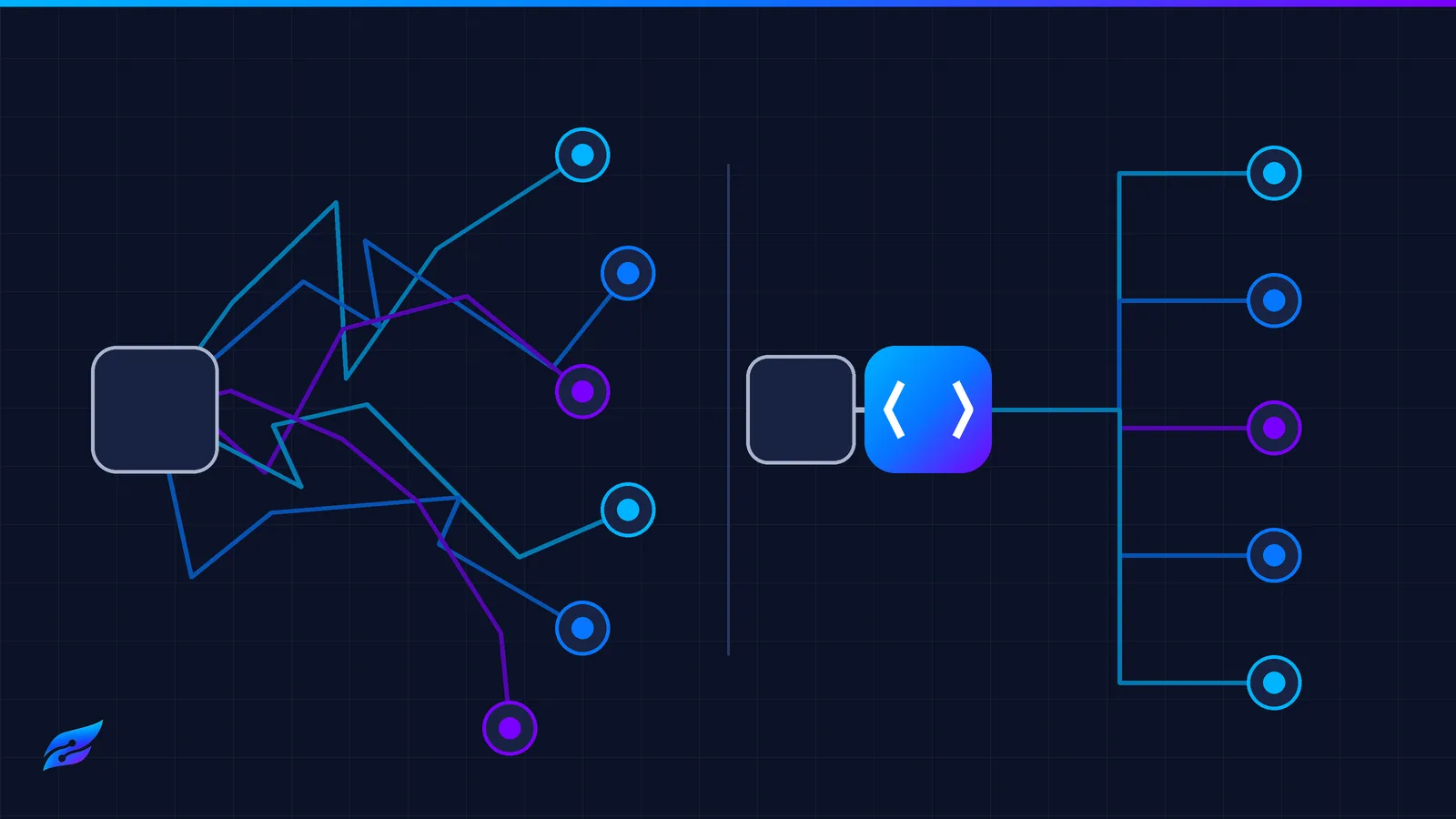
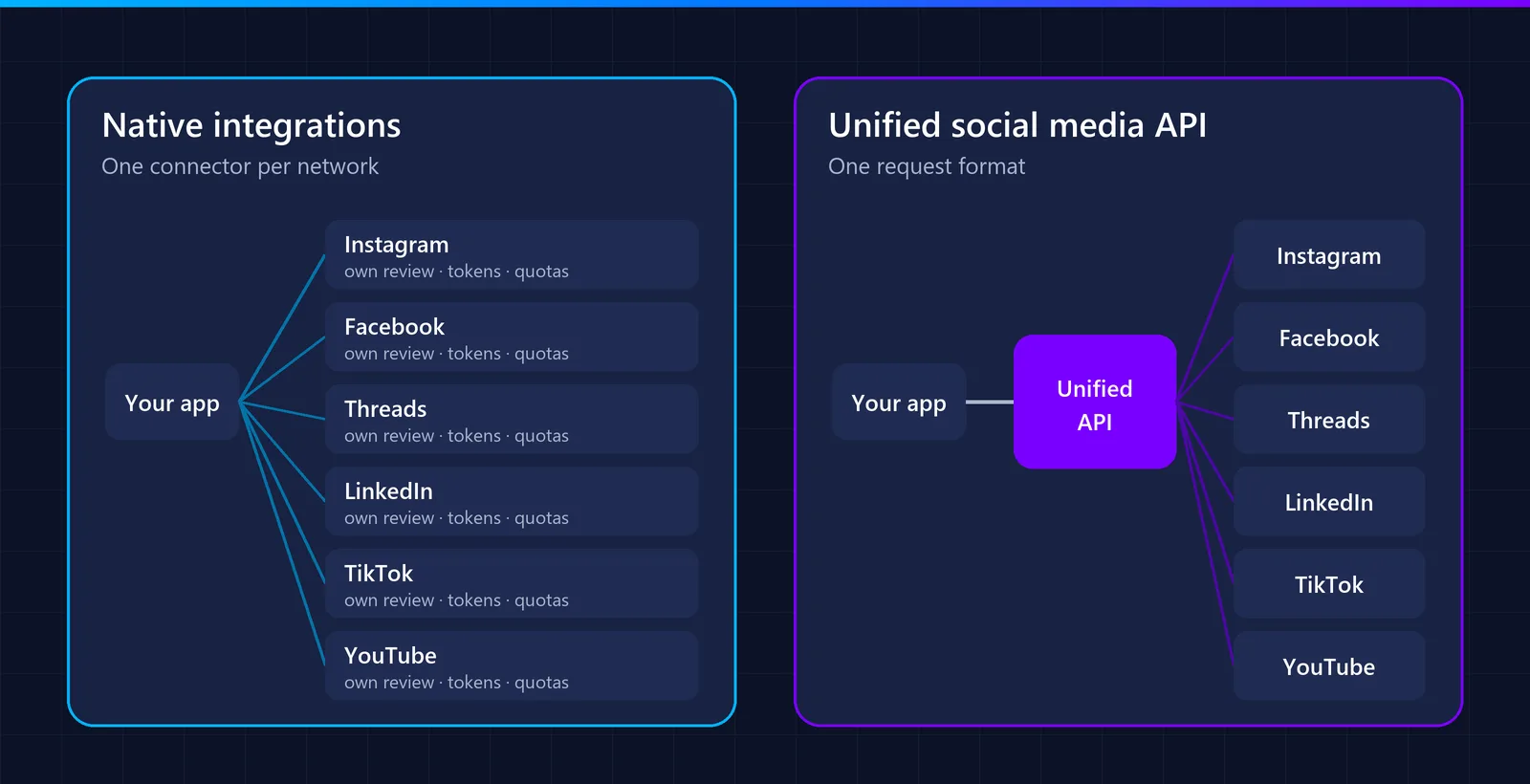
A unified social media API gives you one integration for many networks, while native APIs mean building and maintaining a separate integration for each network. Native gives you full control and no provider in the middle; a unified API takes over the app reviews, token renewals and per-network maintenance in exchange for a fee and some dependence on the provider.
To compare them with facts rather than opinions, we went through the official documentation of eight networks and counted what a native integration really involves: how many API calls it takes to publish one post, how long user tokens last, and how often each API changes. Everything below links to its source, checked in November 2026.
Unified social media API vs native APIs at a glance
| Native APIs | Unified social media API | |
|---|---|---|
| What you build | One integration per network: login, publishing, media upload, errors | One integration with one request format |
| App reviews | You pass each network’s review yourself | The provider registers its app and passes the reviews |
| User tokens | You store, encrypt and renew them, on each network’s schedule | The provider stores and renews them |
| API changes | You follow each network’s versions and retirements | The provider absorbs them |
| Feature coverage | The features approved for your app and its permissions | The features the provider supports and has been approved for |
| Cost | No provider fee; engineering time instead | Subscription or usage fee |
| Dependence | Only on the networks | On the networks and on the provider |
What it takes to publish one post on each network
The first network usually looks simple. The work grows because no two networks publish the same way. This is the sequence each network documents for publishing one image post on behalf of a user (one video on YouTube, which has no image posts). The steps are not a fixed request count: they change with the media type, the authentication state and the upload method.
| Network | Documented steps | Sequence | Detail that catches people out |
|---|---|---|---|
| Facebook Page | 1 | POST /{page-id}/photos | Needs a Page access token, not the user token (docs) |
| 2 | Create a media container, then publish it | Images must be JPEG and hosted on a public URL; for video, Meta suggests checking the container status once a minute (docs) | |
| Threads | 2 | Create a container, then publish it | Meta recommends waiting about 30 seconds before publishing a container (docs) |
| YouTube (video) | 2 | Start a resumable session, then upload the file to the session URL | Interrupted uploads must be resumed with range requests (docs) |
| 3 | Register the image upload, upload the bytes, create the post | Every call needs a Linkedin-Version header with the API version (Images API) | |
| TikTok | 3 | Query creator info, initialise the post, fetch its status (the status may need to be checked more than once) | The privacy level must be one of the options returned for that creator; pulling media from a URL requires a verified URL prefix (docs) |
| Bluesky | 2 | Upload the image as a blob, create the post record (plus creating a session, which can be reused) | The session access token expires after a few minutes (docs) |
| X | 5 | Initialise, append and finalise the media upload, check its status, create the post (the chunked flow X documents; long videos need more append calls) | The current media endpoints replace the older command-based ones (docs) |
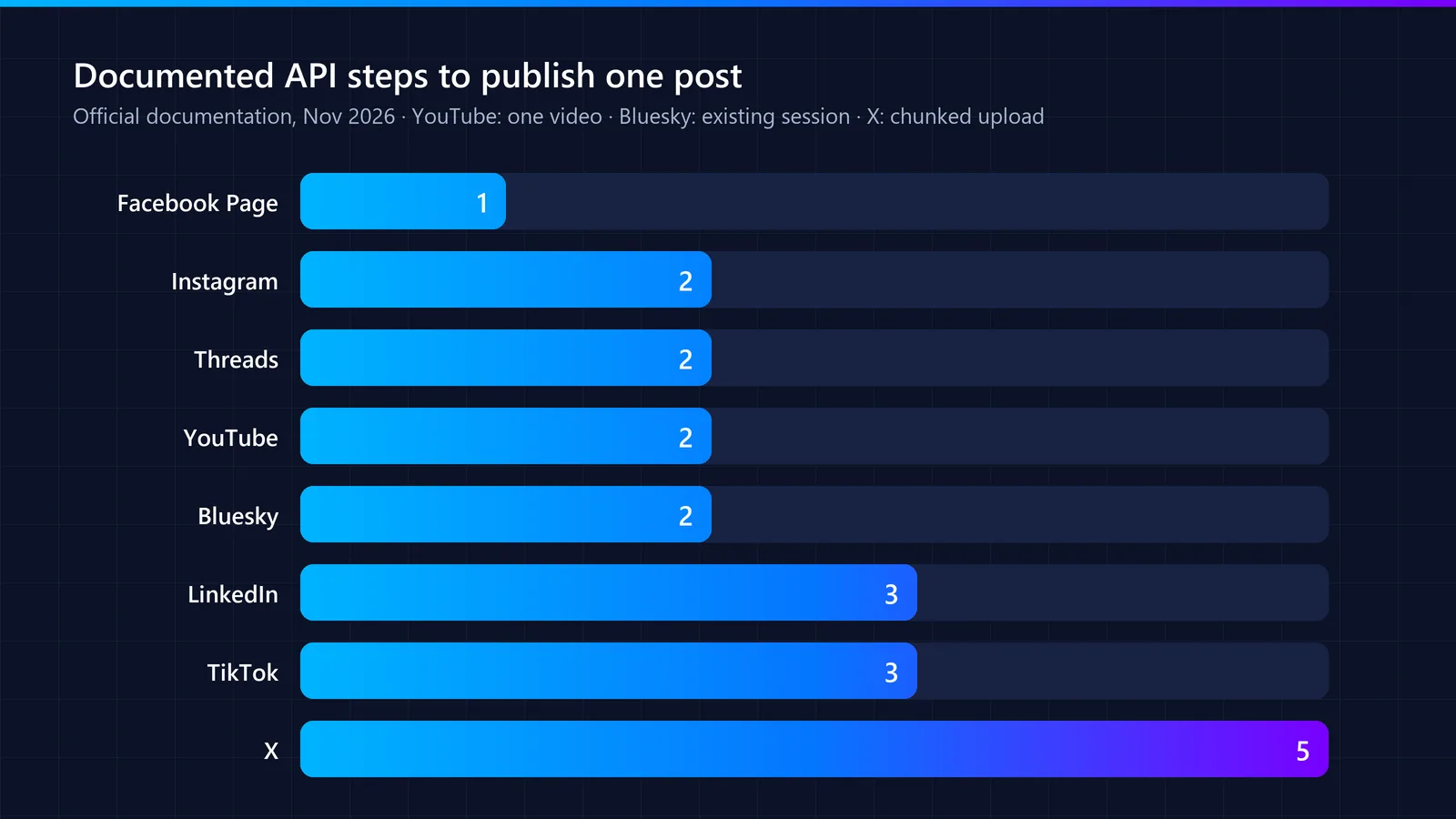
These examples show the integration complexity, not a fixed number of requests for every post: retries, status checks and long videos add more. What stays constant is that the eight networks use four different ways of sending media: some pull it from a public URL, others need the bytes uploaded directly, in chunks or in a resumable session. A unified API reduces this to one request with one media format, but someone still has to build and maintain each of those sequences.
Token expiry: the maintenance you cannot skip
Publishing for a user means keeping that user’s access alive. Each network has its own rules, and none of them is “connect once and forget”:
| Network | Access token | How access is renewed |
|---|---|---|
| Long-lived token valid for 60 days | Refresh it after it is 24 hours old and before it expires; an unrefreshed token cannot be renewed (docs) | |
| Facebook Pages | Long-lived user token about 60 days; long-lived Page tokens have no expiry date | Page tokens can still be invalidated under certain conditions (docs) |
| Threads | 1 hour by default; long-lived token 60 days | Refresh after 24 hours and before expiry; permission grants last 90 days (docs) |
| 60 days | Programmatic refresh tokens (valid one year) for approved Marketing Developer Platform partners; other apps send the user through authorisation again (docs) | |
| TikTok | 2 hours | Refresh token valid 180 days; each refresh returns a new refresh token and invalidates the old one (docs) |
| YouTube (Google) | Short-lived, renewed with a refresh token | Apps still in Testing get refresh tokens that expire in 7 days; tokens unused for six months stop working (docs) |
| X | 2 hours by default | A refresh token is issued only with the offline.access scope (docs) |
| Bluesky | Expires after a few minutes | Renewed with a refresh token (docs) |
Three practical consequences that rarely show up in estimates:
You need background jobs that renew tokens before they expire, on at least four different schedules, and that handle refresh tokens that rotate (TikTok) or do not exist (LinkedIn for most apps).
Some users will have to reconnect no matter what you do. On LinkedIn, if your app has no programmatic refresh tokens (LinkedIn offers them to approved Marketing Developer Platform partners), users must authorise again at least every 60 days.
Read expiry times from each response instead of hardcoding them. Even official examples can disagree with the text around them, as TikTok’s token examples do.
API versions: how often you have to update
Networks change their APIs on their own schedule, and native integrations have to keep up:
Meta (Facebook, Instagram): each Graph API version stays available for at least two years after its release (versioning).
LinkedIn: a new Marketing API version every month, each supported for at least one year; calls without a version header are not accepted (versioning). In practice, every LinkedIn integration has to move to a newer version at least once a year.
TikTok and X: version the path of their endpoints (/v2/, /2/) and publish changes in their documentation and changelogs.
The costs that rarely appear in estimates
Review cycles. Use cases, screencasts and reviewer questions for each network, and another cycle after each rejection. Meta requires App Review for every permission once your app is live (Pages API); TikTok keeps content from unaudited apps private (TikTok); posting as a LinkedIn company page needs the vetted Community Management API (LinkedIn).
Quotas. Limits per account (Instagram, Threads, Bluesky) and per project (YouTube’s default of 100 uploads a day, shared by all your users, quota costs) mean queues, retries and quota requests. Our comparison of social media API limits lists them network by network.
Paid APIs. X charges per request: $0.015 per post, or $0.20 if it contains a URL, prices subject to change (X pricing).
Support. Every network has its own error vocabulary, and your team has to explain each one to users.
A simple way to estimate build vs buy
| Item | Native APIs | Unified API |
|---|---|---|
| Initial work | Networks × (build hours + review hours) × hourly cost | Integration hours × hourly cost |
| Every month | Networks × maintenance hours × hourly cost (tokens, versions, errors) | Provider fee + a few hours of maintenance |
| Variable costs | Paid APIs such as X, billed by the network | Provider pricing (per account, per post or flat), plus any pass-through costs |
Illustrative example (assumed numbers, not measurements). A team that needs four networks, with an engineering cost of $50 an hour:
| Native APIs | Unified API | |
|---|---|---|
| Initial work (assumed) | 120 hours = $6,000 | 20 hours = $1,000 |
| Monthly maintenance (assumed) | 12 hours = $600 a month | 2 hours = $100 a month |
| Plus | Fees of paid network APIs | The provider’s fee and any pass-through costs |
With these assumptions, the unified API saves $5,000 up front and $500 a month in engineering time. It pays off as long as the provider’s monthly fee stays below that difference at your volume. Replace every number with your own before deciding.
Fill in your own estimates. Two inputs decide the result more than any other: how many networks you need and how many end users will connect accounts. Pricing per connected account and pricing per post produce very different bills once you have hundreds of users, so model both with your expected numbers before you choose a provider.
The lock-in question: who owns the connections?
With OAuth, an access token is issued to a specific client application (OAuth 2.0, RFC 6749). When your users connect their accounts through a unified API with the provider’s own app, the tokens belong to the provider’s app, not to yours. Some providers let you plug in your own OAuth app credentials for some networks; in that case the tokens are issued to your app, but you also go through that network’s review yourself.
If the tokens belong to the provider’s app and you later move to your own native integrations, or to another provider, your users will have to connect their accounts again. Plan for it from the start:
- Ask whether the provider lets you use your own app credentials for some networks.
- Keep your own record of which user connected which account and when.
- Check how the provider warns you when a connection is about to expire or is revoked.
When native APIs are the better choice
- You only need one or two networks, and that is unlikely to change.
- You need a feature that exists only in one network’s API and that providers do not cover.
- Owning every integration is part of your product’s value.
- You have engineers available to maintain tokens, versions and reviews long term.
When a unified social media API is the better choice
- Your users expect several networks, and the list will grow.
- Publishing is a feature of your product, not the product itself.
- You want to launch before you could pass every network’s review on your own.
- You are building an AI agent or automation that needs one simple way to post anywhere.
A unified API simplifies the integration, but it does not remove each network’s rules: posting limits such as Instagram’s 100 posts per 24 hours, content policies and the permissions each network grants still apply.
Checklist before choosing a unified API provider
- Networks: which are live today, and which are only planned or in review.
- Pricing model: per connected account, per post or flat, at your expected volume.
- Pass-through costs: how paid network APIs, such as X, are billed.
- Reviews: whether the provider has its own approved app on each network.
- Token renewal: whether connections are renewed automatically and how you are warned before one expires.
- Results: the real post URL and status from each network, with webhooks for success and failure.
- Errors and limits: machine-readable error codes, and each account’s posting limits before you hit them.
- Data: where tokens are stored, how they are encrypted, and whether a data processing agreement is available.
- Exit: the lock-in questions above.
APIWings is one of these providers: a unified social media API built for SaaS products and AI agents. Bluesky is live today, and Instagram, Facebook, LinkedIn, TikTok, YouTube and Threads open as each network approves our integration.
FAQ
What is the difference between a unified social media API and a native API?
A native API is the one each network provides, such as Meta’s Graph API or TikTok’s Content Posting API, and you integrate each one separately. A unified social media API sits on top of several native APIs and gives you one request format and one authentication flow for all of them.
How many API steps does it take to publish one post?
From one to five documented steps, depending on the network: one on a Facebook Page, two on Instagram, Threads and Bluesky (with an existing session), three on LinkedIn and TikTok, and five on X with its chunked media upload. Retries, status checks and long videos add more requests.
How long do social media API access tokens last?
It varies: two hours on TikTok and X by default, 60 days for long-lived Instagram and Threads tokens, 60 days on LinkedIn, and a few minutes for a Bluesky session token. Each network has its own way of renewing them.
Do I still need app reviews with a unified social media API?
Usually not for the networks the provider has already been approved for, because your users connect through the provider’s app. If you use your own app credentials, you go through the reviews yourself.
Is a unified social media API more expensive than building it yourself?
It depends on how many networks you need and how many users connect accounts. For one or two networks, native can be cheaper; for many networks, reviews, token renewal and version updates usually cost more than a provider fee.
Can I switch from a unified API to native APIs later?
Yes, but OAuth tokens belong to the app that requested them, so if you used the provider’s app, your users will need to reconnect their accounts to your own app. Keep your own record of connected accounts to plan the migration.